ब्लॉग – SMM और Telegram ग्रोथ टिप्स

News, guides and tips for growing on social media.

How to Buy Telegram Channel Subscribers (Followers) in 2026

How to Buy Telegram Channel Subscribers (Followers) in 2026

A new Telegram channel faces the same problem as a new shop on an empty street: people walk past places that look deserted. A healthy subscriber count gives your channel social proof, so real visitors are more likely to join and stay. This guide explains how buying Telegram subscribers works, which type to choose and how to order without risking your channel.

Quick answer

Open the Telegram Channel Members – Lifetime service, paste your channel link, choose an amount from 500 and pay with crypto. Subscribers start arriving within a few hours, and the lifetime package is refilled if any drop.

Subscribers or Followers: Is There a Difference?

On Telegram, people who join a channel are called subscribers, and many people search for "Telegram followers" or "Telegram members" for the same thing. All three mean the count shown under your channel name. Groups use the word members, and we cover them in a separate guide on buying Telegram group members.

Why Channel Owners Buy Subscribers

  • First impressions: a channel with 5,000 subscribers looks established, and one with 12 looks abandoned.
  • Easier promotion: ad swaps and cross-promotions usually require a minimum audience size.
  • A starting push: a solid base makes your organic marketing convert better.
  • Telegram search: channel size is one of the signals people see in search results. See how to rank your channel in Telegram search.

Types of Telegram Subscribers

TypeWhat it isBest forStarting price
Regular (30-day refill)Standard accounts, refilled if they drop within 30 daysTesting, quick boosts~$0.15 / 1,000
Regular (lifetime refill)Standard accounts with lifetime refillLong-term channel growth~$0.50 / 1,000
Premium membersAccounts with Telegram Premium, often shown with a star badgeHigher-trust appearance~$1.14 / 1,000
Targeted / with viewsMembers from a chosen country who also view postsLocal channels~$1.16 / 1,000

Prices as of October 2026 and may change. See the current rate on the services page.

Premium members cost more because those accounts pay for Telegram Premium. If that's what you need, read our full guide on buying Telegram premium members.
How to Order Channel Subscribers

How to Buy Telegram Channel Subscribers

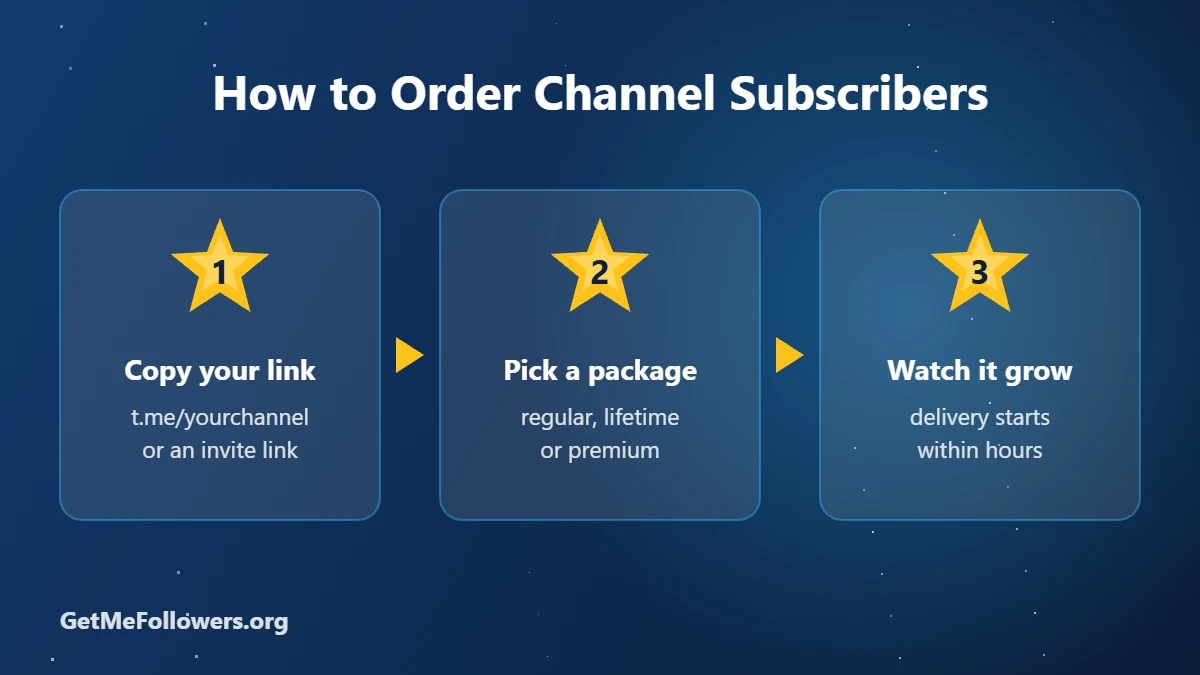
  1. Copy your channel link, for example https://t.me/yourchannel. For a private channel, create an invite link.
  2. Open Channel Members – Lifetime refill or the cheaper 30-day refill option.
  3. Paste the link, enter the quantity (minimum 500) and place the order.
  4. Pay with crypto from your balance.
  5. Delivery starts within a few hours and runs gradually. Public links are processed faster.
👥 Buy Channel Subscribers

Lifetime refill · from 500 · pay with crypto

Refill and Drop: What to Expect

Some purchased accounts leave over time. That's called drop, and it happens with every provider. A refill guarantee means lost subscribers are replaced during the refill period. That's why the lifetime package costs more than the 30-day one: you're paying for longer protection.

Tip: don't buy your whole target at once. Add subscribers in steps while you keep posting, so growth looks natural.

How to Keep Subscribers Engaged

Subscribers make your channel look credible, but content keeps people around. Post on a regular schedule, pin a welcome post and add views to each new post with Telegram post views and reactions. For more ideas, see 8 ways to increase Telegram interaction.

Stay safe

  • We only ever need a public link or @username. Never share your Telegram login code or password with anyone.
  • For private channels and groups, use an invite link that you can revoke later.
  • Start with a small order to test before scaling up.

Frequently Asked Questions

Is it safe to buy Telegram subscribers?

It's safe for your account when the seller only needs your public channel link. We never ask for login codes or passwords. Read more in our guide on whether it's safe to buy Telegram members.

Will bought subscribers read my posts?

Regular subscribers mostly add to your count. If you need views as well, choose a package that includes views, or order post views separately.

How fast will I get subscribers?

Orders usually start within a few hours and are delivered gradually. Public channel links are processed faster than private invite links.

What happens if subscribers leave?

With a refill package, any drop during the refill period is replaced. The lifetime package covers drops for as long as the service runs.

What's the minimum order?

Most channel subscriber packages start at 100 or 500 subscribers, depending on the service.

Can I buy subscribers for a private channel?

Yes. Create an invite link in your channel settings and use it in the order. You can revoke the link once delivery is complete.
Ready to grow your channel?

Get Telegram subscribers with refill protection.

Buy Subscribers
और पढ़ें: How to Buy Telegram Channel Subscribers (Followers) in 2026
How to Gift Telegram Stars to a Friend: 2 Easy Ways

How to Gift Telegram Stars to a Friend: 2 Easy Ways

Want to thank a creator, surprise a friend or top up a teammate's balance? You can send Telegram Stars as a gift in a couple of minutes. There are two easy ways: inside the Telegram app, or through GetMeFollowers, which delivers Stars to any @username for less. Here's how each one works.

Quick answer

In Telegram, open Settings → My Stars, choose the gift option, pick a contact and pay. To send a larger amount for less, order Stars on GetMeFollowers and put your friend's @username in the link field.

Method 1: Gift Stars Inside the Telegram App

This is the built-in option and works on iPhone, Android and desktop.

  1. Open Telegram and go to Settings.
  2. Tap My Stars.
  3. Choose the option to gift Stars.
  4. Select the friend from your contacts.
  5. Pick a pack and confirm the payment through your app store.

Your friend receives a message in the chat showing the gift and how many Stars you sent. It's quick, but you pay app store prices, about $0.02 per Star.

Method 2: Send Stars to Any @username With GetMeFollowers

This route suits bigger gifts, people who aren't in your contacts, or anyone who prefers paying with crypto instead of an app store.

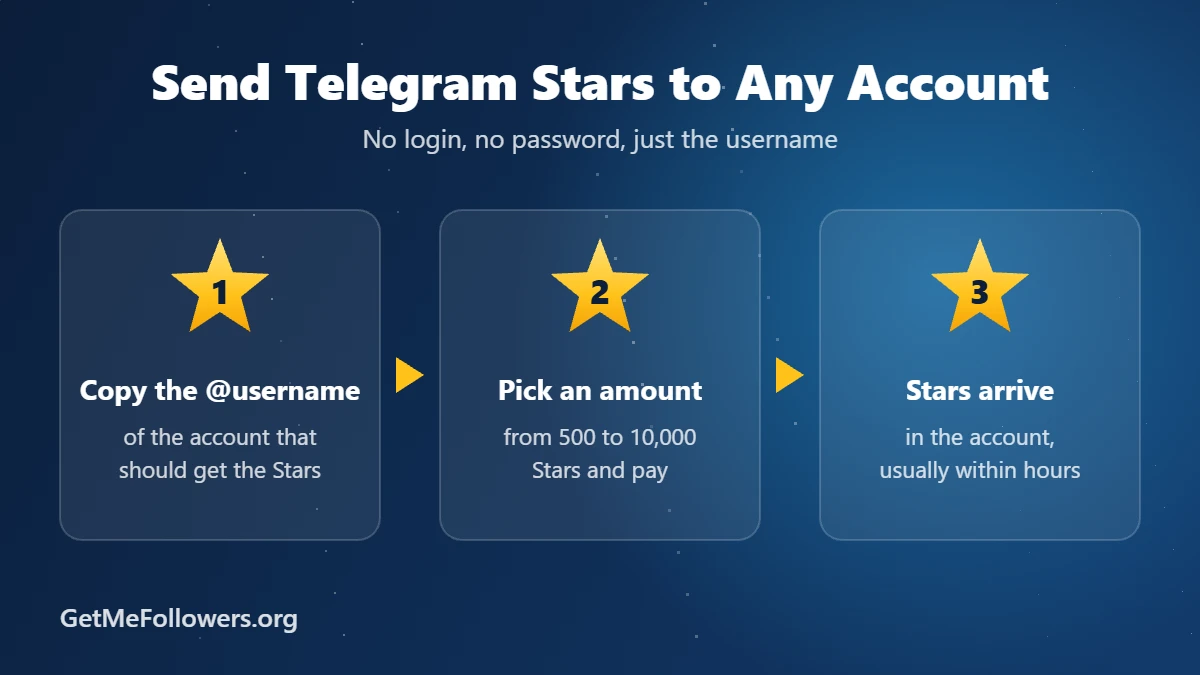
Send Telegram Stars to any account in three steps

  1. Ask your friend for their Telegram @username, or copy it from their profile.
  2. Open the Telegram Stars – Gift to account service.
  3. Paste the username into the link field, for example @username.
  4. Enter the amount, anywhere from 500 to 10,000 Stars, and place the order.
  5. Pay with crypto. The Stars arrive in their account, usually within a few hours (allow up to 12).
In the appGetMeFollowers
Price per 1,000 Stars~$20$16.15
RecipientYour contactsAny @username
PaymentApp Store / Google PlayCrypto
Order sizeFixed packs500 to 10,000 Stars
🎁 Send Telegram Stars

No login needed, just the @username

Gifting Stars to a Channel Post

Want to support a channel instead of a person? Send Stars as a paid reaction on one of its posts, and the channel owner receives them. For larger amounts, channel owners can order Telegram Stars for posts by pasting the post link. Paid reactions must be turned on in the channel first.

Gift Ideas: Who Should You Send Stars To?

  • A friend who uses AI bots, so they can keep chatting without topping up.
  • A creator you follow, as a thank-you for their content.
  • A teammate or client who runs bots or mini apps that charge in Stars.
  • A gamer playing Telegram mini app games.

Safety Tips Before You Send

  • Check the username twice. Stars sent to the wrong account can't be taken back.
  • Never share login codes. Neither you nor your friend should give anyone a Telegram code or password. Only the public username is needed.
  • Watch out for "Star doubling" scams. Nobody can multiply your Stars. Messages promising that are fake.

New to Stars? Start with What Are Telegram Stars, or compare every buying option in How to Buy Telegram Stars.

Frequently Asked Questions

Can I gift Telegram Stars to someone who isn't in my contacts?

In the app you usually pick from your contacts. On GetMeFollowers you only need the person's @username, so they don't have to be in your contacts.

Will my friend know who sent the Stars?

When you gift in the app, your friend sees a gift message in your chat. With a GetMeFollowers order the Stars simply arrive in their balance, so tell them they're from you.

What's the minimum I can gift?

In the app, the smallest pack. On GetMeFollowers, the minimum order is 500 Stars and the maximum is 10,000.

How long does it take for gifted Stars to arrive?

App gifts arrive instantly. GetMeFollowers orders usually arrive within a few hours, and in some cases can take up to 12 hours.

Does my friend need Telegram Premium to receive Stars?

No. Any Telegram account can receive and spend Stars.

और पढ़ें: How to Gift Telegram Stars to a Friend: 2 Easy Ways
What Are Telegram Stars and What Can You Use Them For?

What Are Telegram Stars and What Can You Use Them For?

If you've seen a ⭐ price on a bot, a locked photo in a channel or a gold star reaction under a post, you've already met Telegram Stars. They're the currency Telegram uses for digital purchases inside the app. This guide explains what Stars are, how they work, what you can spend them on and what they cost.

In one sentence

Telegram Stars are an in-app balance you top up once and then spend on bots, mini apps, paid posts, reactions, gifts and subscriptions, without entering card details every time.

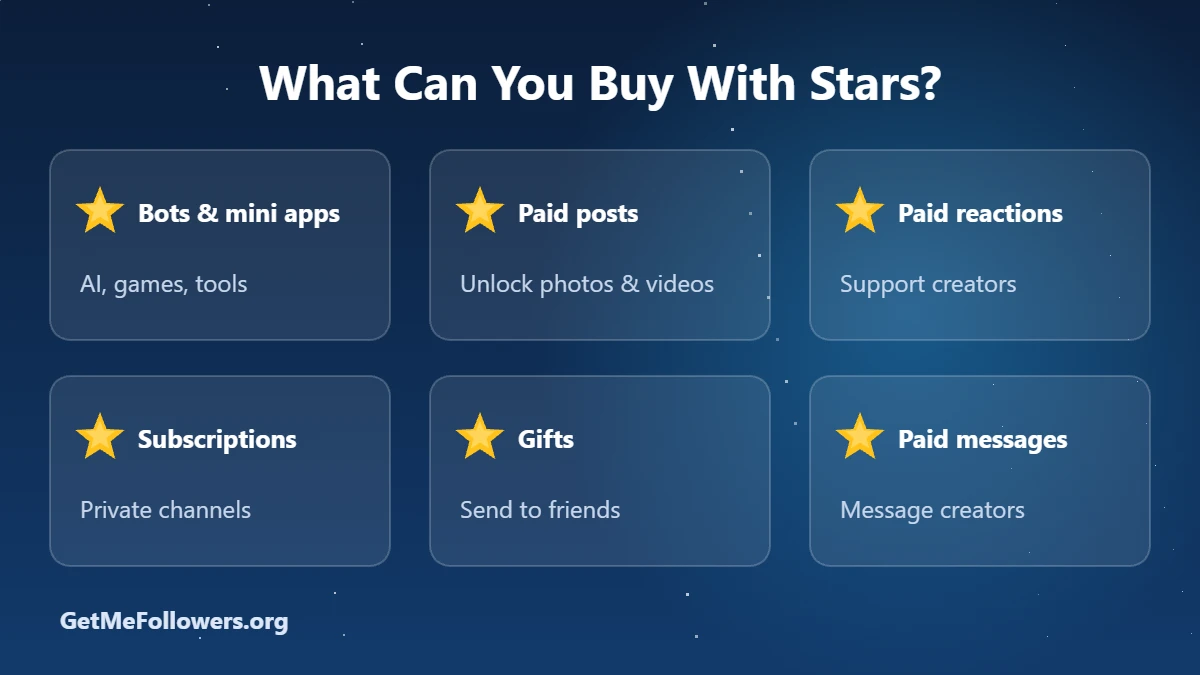
What you can buy with Telegram Stars: bots and mini apps, paid posts, paid reactions, subscriptions, gifts and paid messages

How Telegram Stars Work

Telegram launched Stars in 2024 to give every bot, channel and mini app one shared way to get paid. Think of it like a gift card balance that works across all of Telegram:

  1. You buy Stars and they land in your balance.
  2. You spend them anywhere that shows a Star price.
  3. The creator or developer receives them, and can later withdraw through Fragment.

Stars are not a cryptocurrency, and you can't send them back to your bank. They exist only inside Telegram.

What Can You Use Telegram Stars For?

🤖 Bots and mini apps

Many bots charge in Stars: AI assistants per request, games for extra lives or items, and tools for premium features. Paying takes one tap because your balance is already there.

🔒 Paid photos and videos

Channel owners can post media that stays blurred until you unlock it with Stars. You pay once and keep access to that post.

⭐ Paid reactions

Under some channel posts you'll see a star reaction. Tapping it sends real Stars to the channel owner, which makes it a direct way to support creators you like.

📅 Channel subscriptions

Private channels can charge a monthly Star fee for access. When you subscribe, the fee renews from your balance.

🎁 Gifts

Telegram gifts are bought with Stars, and you can also send Stars themselves as a present. See our guide on how to gift Telegram Stars.

✉️ Paid messages

Some users and channels charge a few Stars per message to cut down on spam.

How Much Do Telegram Stars Cost?

In the Telegram app, Stars cost about $0.02 each, roughly $20 for 1,000. The exact price varies slightly by country and app store, because Apple and Google take a fee.

WhereApprox. price for 1,000 Stars
Telegram app (App Store / Google Play)~$20
Fragment (paid in TON)Follows the TON price
GetMeFollowers$16.15

Prices as of October 2026. For a full walkthrough of every method, read How to Buy Telegram Stars.

⭐ Get Telegram Stars

$16.15 per 1,000 Stars · sent to any @username · pay with crypto

Telegram Stars vs Telegram Premium

People often mix these up, but they're different things:

  • Stars are a balance you spend on content, bots and gifts.
  • Premium is a subscription that unlocks app features, such as larger uploads and faster downloads.

You don't need Premium to use Stars, and Stars don't give you Premium features. If you want Premium, see our Telegram Premium subscriptions.

Can You Earn or Withdraw Telegram Stars?

Regular users can only spend Stars. Channel and bot owners can earn them from paid posts, reactions, subscriptions and bot payments, then withdraw through Fragment to a TON wallet once they reach the minimum balance. Owners can also use earned Stars to buy Telegram ads at a discount.

Running a channel? You can boost your post activity with Telegram Stars for posts, which are star reactions sent to a post you choose. Turn on Channel settings → Reactions → Enable Paid Reactions first.

Frequently Asked Questions

Are Telegram Stars real money?

They're bought with real money, but they're an in-app currency, not cash or crypto. You can only spend them inside Telegram.

Do I need Telegram Premium to use Stars?

No. Any Telegram user can buy and spend Stars.

How much is one Telegram Star worth?

About $0.02 when bought in the app. On GetMeFollowers it works out to about $0.016 per Star.

Can I get my money back for unused Stars?

Regular users can't convert Stars back to money. Only channel and bot owners can withdraw Stars they've earned, through Fragment.

Can I send Stars to another person?

Yes. You can gift Stars in the app, or order them on GetMeFollowers with the other person's @username.

और पढ़ें: What Are Telegram Stars and What Can You Use Them For?
How to Buy Telegram Stars in 2026: 4 Easy Ways (Prices Compared)

How to Buy Telegram Stars in 2026: 4 Easy Ways (Prices Compared)

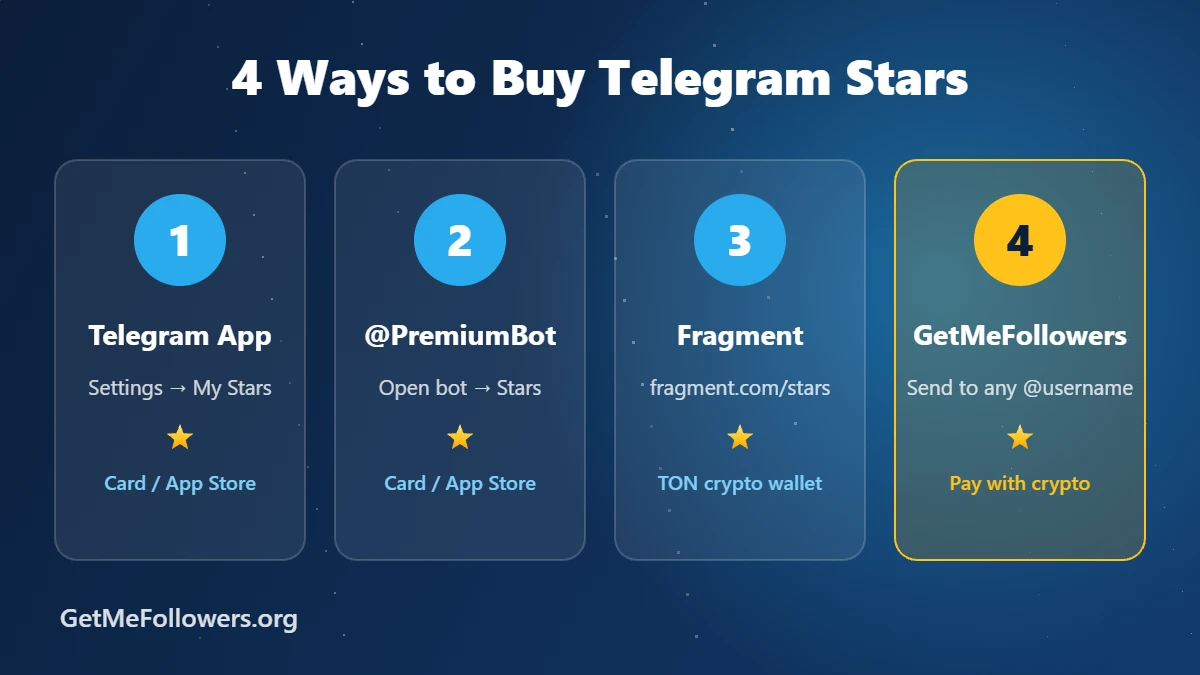
Telegram Stars are the in-app currency you use to pay bots, unlock paid posts, send paid reactions and buy gifts inside Telegram. You can buy them in four ways: in the Telegram app, through the official @PremiumBot, on Fragment with TON, or from a reseller like GetMeFollowers that sends them straight to any @username. This guide walks through each method, compares prices and shows which one makes sense for you.

Quick answer

Open Telegram, go to Settings → My Stars, choose a pack and pay through the App Store or Google Play. That's the easiest way. If you want a lower price per Star, want to send Stars to someone else, or want to pay with crypto, order Telegram Stars on GetMeFollowers: you only need the Telegram username, never a password.

Four ways to buy Telegram Stars: Telegram app, @PremiumBot, Fragment with TON, and GetMeFollowers

What Are Telegram Stars?

Telegram introduced Stars in 2024 as a single currency for digital purchases inside the app. Instead of entering card details in every bot or mini app, you top up your Stars balance once and spend it anywhere that accepts Stars.

Here's what people use them for:

  • Bots and mini apps: paid AI requests, games, digital products and services.
  • Paid posts: unlocking photos or videos that channel owners put behind a Star price.
  • Paid reactions: sending a ⭐ reaction to a channel post. The channel owner receives all of those Stars.
  • Subscriptions: joining private channels that charge a monthly fee in Stars.
  • Gifts: buying Telegram gifts for friends, or sending Stars as a present.
  • Paid messages: messaging users or channels that charge per message.

Stars are not a cryptocurrency, and ordinary users can't cash them out. Only bot and channel owners can withdraw the Stars they earn, through Fragment.

How Much Do Telegram Stars Cost?

The price depends on where you buy. In the app, Stars cost roughly $0.02 each (for example, about $1.99 for 100 Stars), and the exact price changes slightly by country and app store. Here is how the main options compare:

Method Approx. price How you pay Best for
Telegram app~$20 per 1,000 StarsApp Store / Google PlaySmall, quick top-ups
@PremiumBotSimilar to the appPayment options in the botDesktop users
FragmentFollows the TON priceTON from a crypto walletPeople who already hold TON
GetMeFollowers$16.15 per 1,000 StarsCryptoLower price, gifting, no app store

Prices are as of October 2026 and can change. Check the current rate on the services page before you order.

Method 1: Buy Stars in the Telegram App

This is the route most people take, because it's already in your phone.

  1. Open Telegram and tap Settings.
  2. Tap My Stars.
  3. Choose a pack, for example 100, 500 or 1,000 Stars.
  4. Confirm the payment with your App Store or Google Play account.
  5. The Stars appear in your balance right away.

The downside is the price: app stores take a cut, which is part of why in-app Stars cost more than other options.

Method 2: Buy Stars Through @PremiumBot

Telegram's official @PremiumBot sells Stars too, which is handy on Telegram Desktop or the web version.

  1. Search for @PremiumBot and press Start.
  2. Choose the Stars option.
  3. Pick the amount and complete the payment the bot offers.
Only use the official bot with the blue checkmark. Copycat bots with similar names are a common scam.

Method 3: Buy Stars on Fragment With TON

Fragment is Telegram's own marketplace, and it's the official way to buy Stars with cryptocurrency. It also allows bigger purchases than the in-app packs.

  1. Go to fragment.com and open the Stars section.
  2. Connect a TON wallet such as Tonkeeper or Telegram Wallet.
  3. Enter the username that should receive the Stars and the amount.
  4. Confirm the transaction in your wallet.

Fragment works well if you already own TON. If you don't, you'll need to buy TON on an exchange first and move it to a wallet, which adds steps and fees.

Method 4: Buy Telegram Stars on GetMeFollowers

If you'd rather skip app store pricing and crypto wallets, GetMeFollowers delivers Stars directly to any Telegram account. You can top up your own account or send Stars to a friend, a client, or a channel admin.

How to send Telegram Stars to any account in three steps: copy the username, pick an amount, Stars arrive

How it works:

  1. Open the Telegram Stars – Gift to account service.
  2. Paste the Telegram @username that should receive the Stars into the link field.
  3. Enter how many Stars you want, from 500 to 10,000, and place the order.
  4. Pay with crypto. The Stars are sent to that account, usually within a few hours (allow up to 12).

Why people choose this option:

  • Lower price: $16.15 per 1,000 Stars, about 20% less than typical in-app pricing.
  • No login needed: only the public username. You never share a password or login code.
  • Gift-friendly: send Stars to anyone, not just your own account.
  • Pay with crypto: no app store or card required.
⭐ Buy Telegram Stars Now

From $16.15 per 1,000 Stars · delivered to any @username

Running a channel? Get Stars reactions on your posts

Channel owners can also order Telegram Stars for posts: Star reactions sent to a specific post, starting from 50 Stars. Before ordering, turn on paid reactions in your channel: Channel settings → Reactions → Enable Paid Reactions. Then paste the post link into the order form.

How to Gift Telegram Stars to a Friend

There are two easy ways to send Stars as a gift:

  • In the app: in Settings → My Stars, use the gift option, pick a contact and pay. The friend gets a message showing the gift.
  • On GetMeFollowers: place an order with your friend's @username in the link field. They don't need to do anything, and they don't need to share any login details.

Tips Before You Buy

Stay safe

  • Never give anyone your Telegram login code or two-step password. A legitimate seller only needs your username.
  • Double-check the username before ordering. Stars sent to the wrong account can't be pulled back.
  • Be careful with private sellers in chats who ask you to pay first with no protection.

Want Telegram Premium instead? See our Telegram Premium subscriptions. Premium unlocks features like faster downloads and larger uploads, while Stars are a balance you spend on content and bots.

Frequently Asked Questions

What are Telegram Stars used for?

You spend them inside Telegram on bots and mini apps, paid photos and videos, paid reactions, private channel subscriptions, gifts and paid messages.

How much is 1 Telegram Star?

Inside the app, one Star costs about $0.02, so 1,000 Stars are around $20. On GetMeFollowers, 1,000 Stars cost $16.15, which works out to about $0.016 per Star.

Is it safe to buy Telegram Stars from a third-party site?

It's safe when the seller only asks for your public username. GetMeFollowers never asks for your login code or password. Avoid anyone who asks for those details.

How long does delivery take on GetMeFollowers?

Most orders arrive within a few hours. Activation can take up to 12 hours in some cases.

What is the minimum order?

The minimum is 500 Stars and the maximum is 10,000 Stars per order for the gift-to-account service. Stars for posts start at 50.

Can I turn Telegram Stars back into money?

Regular users can't. Only bot and channel owners can withdraw the Stars they earn, through Fragment.

Can I buy Stars for someone else?

Yes. In the app you can use the gift option, and on GetMeFollowers you simply enter their @username when you order.

Ready to top up?

Get Telegram Stars delivered to any account, without app store fees.

Order Telegram Stars
और पढ़ें: How to Buy Telegram Stars in 2026: 4 Easy Ways (Prices Compared)
How to Create Telegram Search Ads and Increase Your Chances of Approval

How to Create Telegram Search Ads and Increase Your Chances of Approval

Telegram Search Ads are one of the newest and most targeted ways to reach potential users within the Telegram ecosystem. Through Telegram Ads, you can promote a profile, channel, group, or bot directly in Telegram search results and attract people who are actively looking for related topics or services.

However, many advertisers face a common challenge: their ads remain pending for a long time or get rejected during the review process.

In this guide, we'll explain how to create Telegram Search Ads and share practical insights based on our real-world experience to help improve your chances of approval.

What Are Telegram Search Ads?

Telegram Search Ads allow advertisers to display their profile, channel, group, or bot when users search for specific keywords within Telegram.

Unlike traditional channel promotions, Search Ads help you reach users who are already interested in a particular topic, making them highly targeted and potentially more effective

Step 1: Access the Telegram Ads Platform

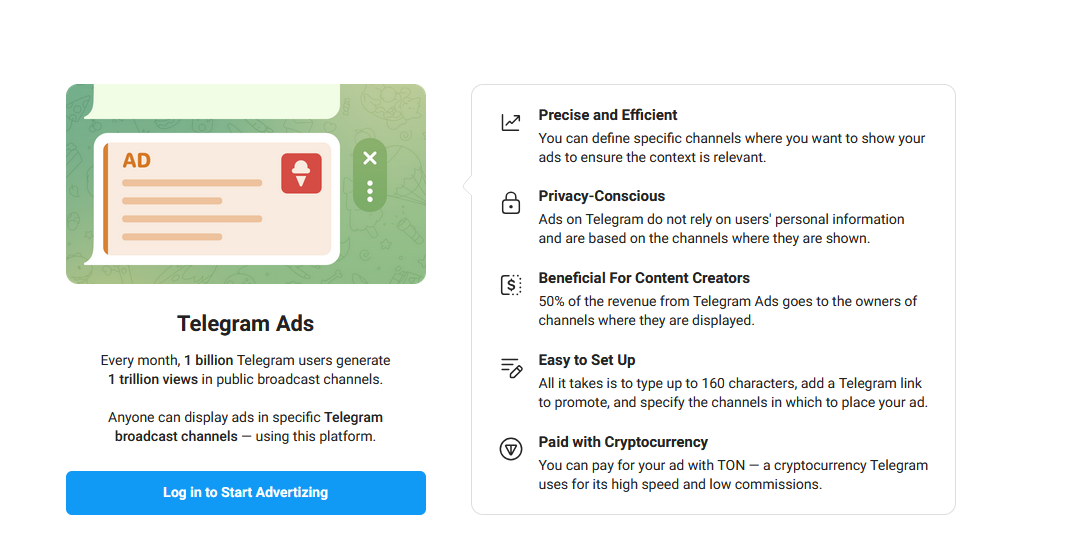
First, visit the official Telegram Ads platform:

ads.telegram.org

Log in using your Telegram account.

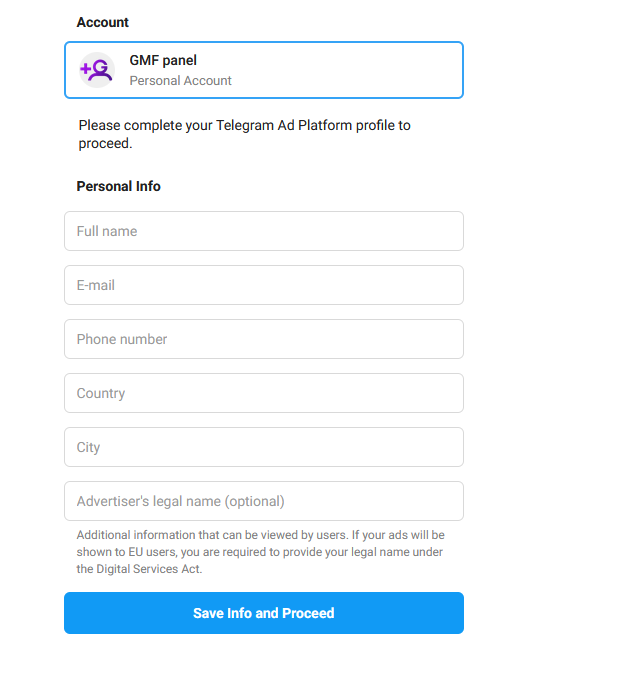
If this is your first time using the platform, you'll be asked to complete your advertiser profile before creating campaigns.

Telegram Ads dashboard login page

Step 2: Complete Your Advertiser Profile

Telegram may request basic information such as:

  • Full name
  • Email address
  • Phone number
  • Country
  • City

*We recommend providing accurate information whenever possible, especially if your account may require additional verification in the future.

Telegram Ads account profile setup form

Step 3: Fund Your Advertising Account

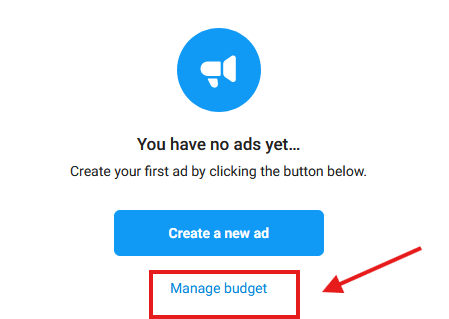
Before creating a campaign, you'll need to add funds to your Telegram Ads account.

Once your balance is funded with TON, you'll be able to launch new advertising campaigns.

Telegram Ads budget management page

Prepare Your Account Before Running Ads

One of the biggest mistakes advertisers make is focusing only on the advertisement itself while ignoring the profile being promoted.

Based on our experience, the quality and completeness of the destination profile can influence the approval process.

1. Consider Using Telegram Premium

Accounts with Telegram Premium often appear more professional and have access to additional profile and business features.

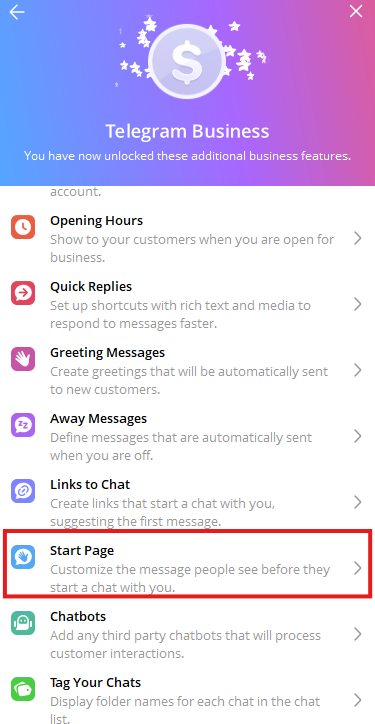
Some Telegram Business tools and advanced account customization options are only available to Premium users.

For this reason, many businesses upgrade their accounts before launching advertising campaigns.

If you need Telegram Premium, you can obtain it through GetMeFollowers 

2. Choose a Professional Profile Picture

Your profile image should:

  • Match your niche or business
  • Be high quality
  • Avoid copyright issues
  • Avoid overly aggressive promotional designs

Extremely flashy images with excessive visual effects may appear less trustworthy.

Telegram Business start page settings

3. Choose an Appropriate Account Name

Your account name should clearly relate to your business, service, or niche.

Misleading or spam-like names can reduce trust and credibility.

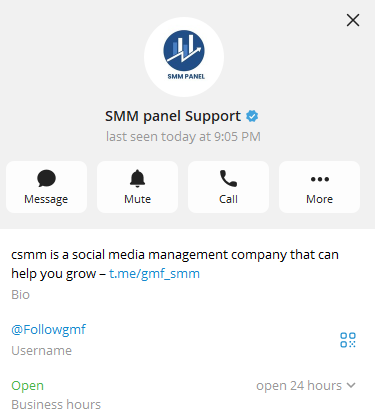
4. Complete Your Bio

Your Telegram bio is one of the most important profile elements.

A good bio should:

  • Explain what you offer
  • Include relevant keywords
  • Be written in the language of your target audience

Example of a Telegram business profile

5. Use Telegram Business Intro

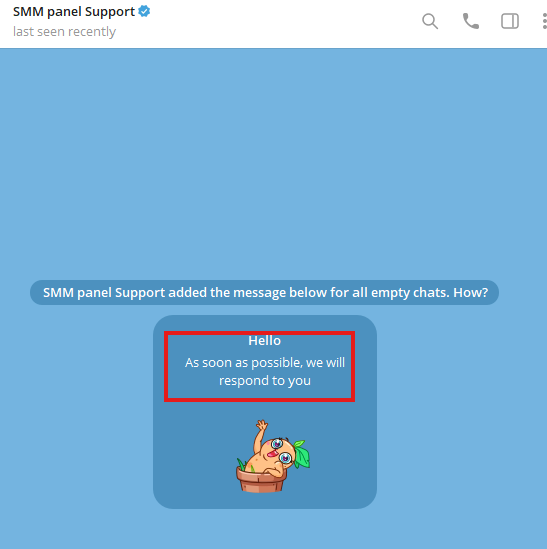
If you're using Telegram Business features, create a professional introduction message.

This helps present your account as more complete and trustworthy.

6. Review Your Privacy Settings

Before launching ads, make sure your account appears complete and professional.

Based on our experience, accounts that completely hide their activity and profile information may appear less trustworthy.

Telegram custom introduction message example

Creating a Telegram Search Ad

After preparing your account, create a new campaign.

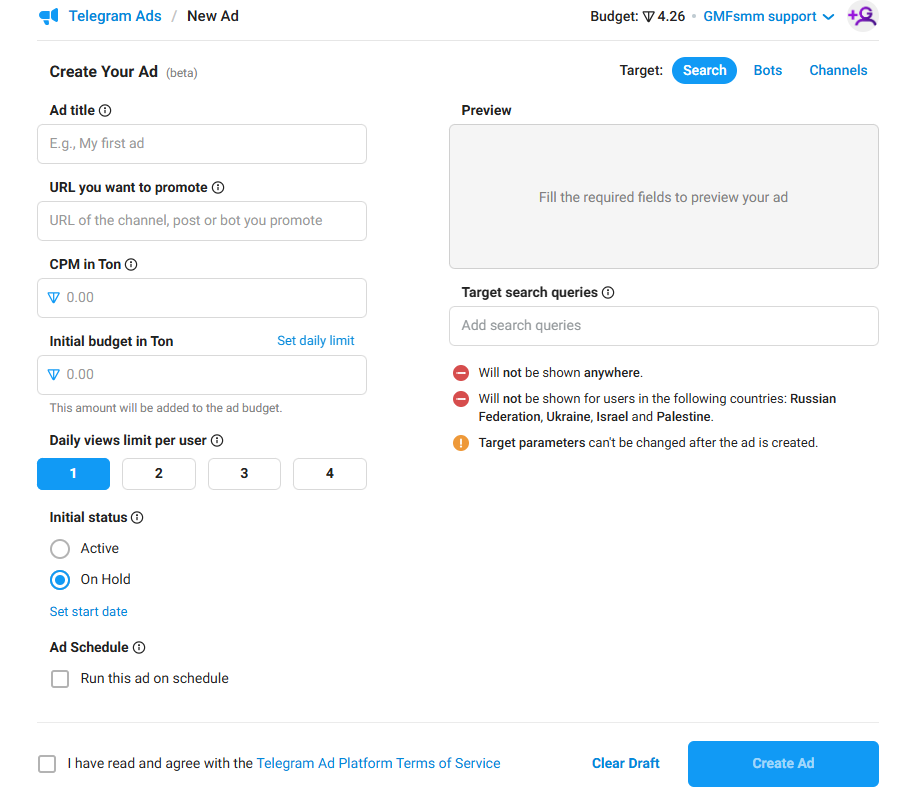
You'll need to configure:

  • Campaign name
  • Destination profile URL
  • Budget
  • Target keywords
  • Daily limits

Creating a Telegram search advertisement

Choosing the Right Keywords

Keyword selection is one of the most important parts of Search Ads.

Your keywords should:

  • Be relevant to your service
  • Have search demand
  • Match your destination profile

Keep in mind that certain keywords may not be approved by Telegram's advertising system.

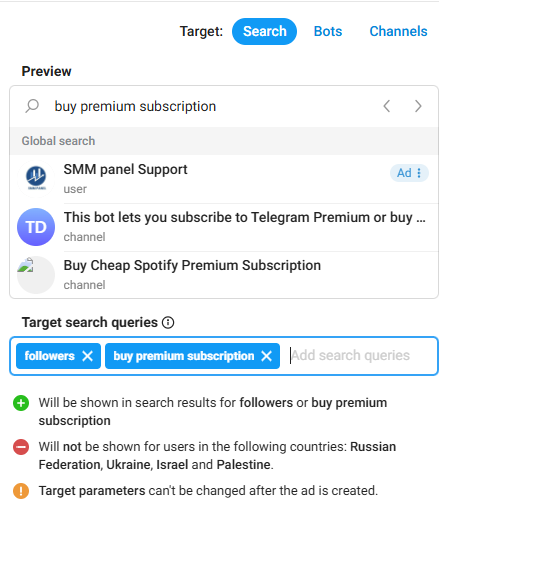
Telegram search keywords targeting interface

Which Types of Ads Face More Scrutiny?

Certain industries often receive additional review attention, including:

  • Financial services
  • Investment products
  • Cryptocurrency
  • Online income opportunities
  • Health-related products
  • Gambling services
  • Adult content

If you operate in one of these categories, transparency becomes even more important.

What Does Telegram Review During Ad Approval?

Many advertisers assume Telegram only reviews the ad text.

In reality, the review process may also involve:

  • The destination profile or channel
  • Profile quality
  • Account information
  • Selected keywords
  • The product or service being promoted
  • Compliance with Telegram Ads policies

This is one reason why two similar advertisements may receive different approval outcomes.

What Claims Should You Avoid?

One of the most common reasons ads get rejected is the use of misleading or unrealistic claims.

Avoid statements such as:

  • Guaranteed income
  • Guaranteed profits
  • Instant growth
  • 100% success rates
  • Best service in the world

Instead, focus on clearly explaining the value of your product or service.

Why Ad and Profile Consistency Matters

If your advertisement promotes one thing but your profile shows something completely different, approval becomes less likely.

Make sure:

  • Your ad matches your profile
  • Contact information is available
  • Services are clearly explained
  • Your profile appears complete

Consistency helps build trust with both users and reviewers.

Why Is My Telegram Ad Still Pending?

This is one of the most common questions among advertisers.

Based on our experience, ads may remain pending longer because of:

  • Sensitive keywords
  • Cryptocurrency-related topics
  • Financial services
  • Incomplete profiles
  • High review volume within Telegram Ads

In most situations, it's best to wait up to 48 hours before taking further action.

What Should You Do If Your Telegram Ad Gets Rejected?

If your ad is rejected:

  • Avoid repeatedly resubmitting the same campaign
  • Review your profile and campaign setup
  • Check for potentially problematic keywords
  • Create a new campaign if necessary

In some cases, creating a fresh campaign can be more effective than resubmitting a rejected one.

Common Mistakes That Lead to Ad Rejection

Some of the most common mistakes include:

  • Incomplete profiles
  • Empty bios
  • Poor profile images
  • Irrelevant account names
  • Sensitive keywords
  • Misleading claims
  • Lack of service information

A Valuable Tip From Our Experience

Many advertisers believe only the ad copy is reviewed.

In practice, profile quality, profile photos, usernames, bios, account information, and service descriptions can all influence the review process.

That's why we always recommend optimizing your account before launching a campaign.

Frequently Asked Questions – FAQ

Why Was My Telegram Ad Rejected?

Common reasons include incomplete profiles, sensitive keywords, misleading claims, or inconsistencies between the ad and the destination profile.

How Long Does Telegram Ad Approval Take?

Most campaigns are reviewed within a few hours to 48 hours, although certain industries may require additional review time.

Does Telegram Review More Than Just the Ad Text?

Yes. Telegram may also evaluate the destination profile, bio, username, profile image, keywords, and the promoted service itself.

Should I Resubmit a Rejected Telegram Ad?

Based on our experience, it's often better to identify the potential issue first. In some situations, creating a new campaign performs better than resubmitting the same one.

We have also found that advertisers sometimes leave short notes in the campaign name field requesting a review or asking for clarification regarding a rejection. While there is no guarantee this will help, it has occasionally produced better results than resubmitting without any explanation.

Are Cryptocurrency Ads Allowed on Telegram?

Yes, but cryptocurrency-related advertisements often receive more detailed reviews than other categories.

Does Telegram Premium Help With Ad Approval?

Telegram has never officially stated that Premium accounts receive preferential treatment. However, more complete and professional-looking accounts generally create a better impression.

Does Telegram Review the Promoted Profile?

Yes. Based on advertiser experiences, Telegram may review the profile, bio, username, profile image, and other account details alongside the advertisement itself.

Where Can I Get Telegram Premium?

You can purchase Telegram Premium through GetMeFollowers for quick and easy activation.

Key Takeaways

  • Complete your profile before advertising.
  • Use a professional profile picture.
  • Write a relevant bio.
  • Avoid unrealistic claims.
  • Choose relevant keywords.
  • Keep your ad and profile consistent.
  • Follow Telegram Ads policies.
  • Investigate rejection reasons before resubmitting.

Final Thoughts

Telegram Search Ads can be an excellent way to attract highly targeted users, but success depends on more than simply creating an advertisement.

The quality of your profile, the transparency of your offer, and compliance with Telegram's advertising standards can all influence approval outcomes.

By preparing your account properly and presenting your services clearly, you can significantly improve your chances of getting approved and running successful Telegram advertising campaigns.

और पढ़ें: How to Create Telegram Search Ads and Increase Your Chances of Approval
How to Rank Your Bot in Telegram Global Search

How to Rank Your Bot in Telegram Global Search

Want people to find your bot when they type a keyword into Telegram's search bar? In this guide we'll show you, step by step, how to create a bot, set it up and get it to appear in Telegram's global search.

Step 1: Create your bot with BotFather

First, you need a bot. If you don't have one yet, create it through Telegram's official bot: @BotFather.

Warning: Telegram's algorithm may penalize bots with sudden fake member spikes. Use gradual, organic growth methods.

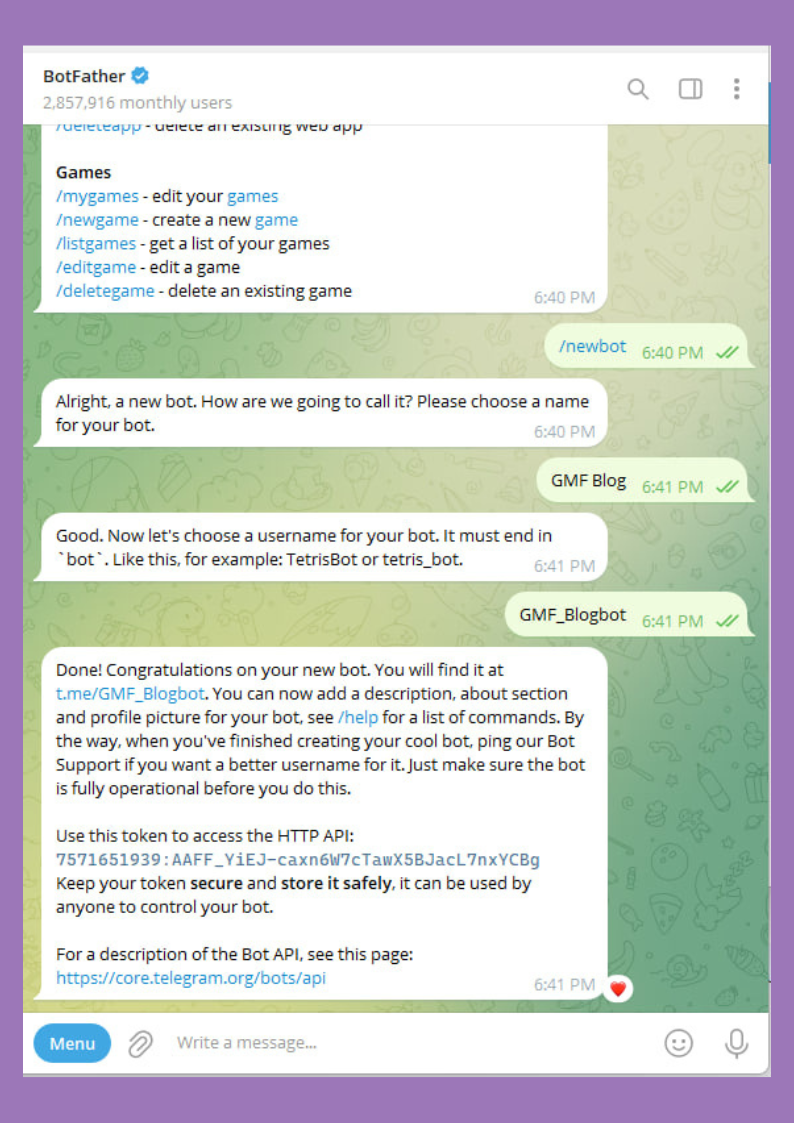
Now, open BotFather and send the command: /newbot

Then, Choose a name and a unique username (ending with bot).

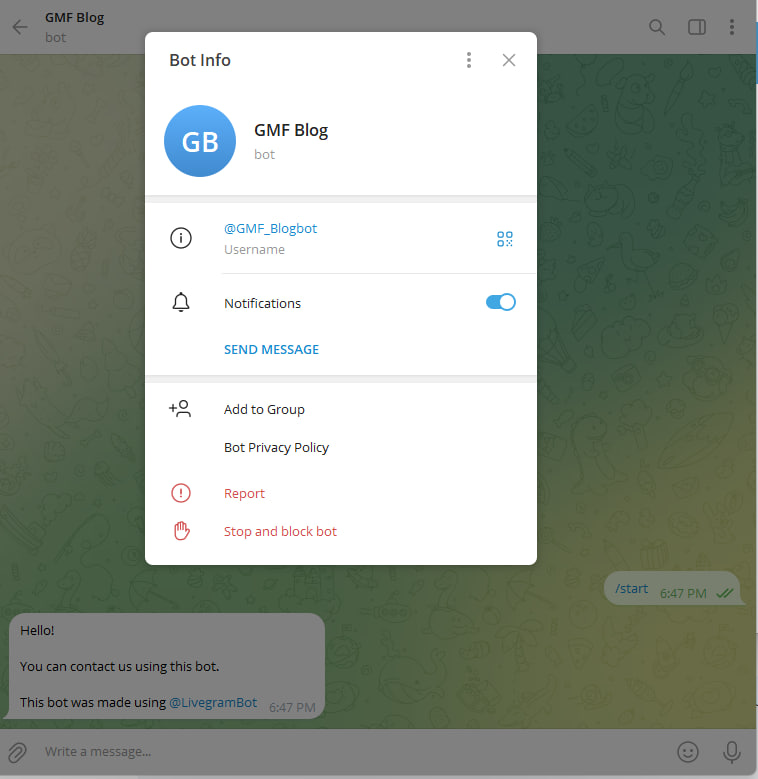
Creating a new bot with /newbot in Telegram BotFather

Congratulations! Your bot has been created.

Now, you have an empty bot. The next step is to program it. But don’t worry if you don’t know how to code—you can simply connect it to a master bot builder to enable smart auto-reply features. For example:

@LivegramBot

Step 2: Connect Your Bot to Livegram
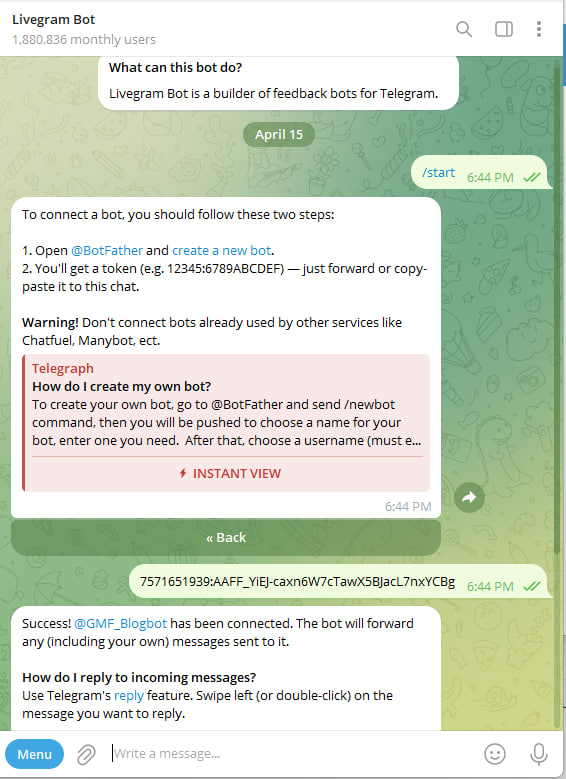
Now, take your bot’s API token (given by BotFather) and provide it to @LivegramBot. This will automatically handle:
✅ Smart auto-replies
✅ Message management
✅ No coding required!

Telegram bot successfully created via BotFather

Step 3: Your Bot is Ready!

As shown in the image, your bot is now fully set up and ready for ranking optimization.

Next, we’ll implement key strategies to boost its visibility in Telegram’s global search.

Understanding Telegram’s Search Ranking Algorithm

Following Telegram’s recent update, the search algorithm has changed significantly. Here’s how ranking works now:

  1. Premium Members Boost Visibility: The more Premium subscribers your bot has, the higher it ranks.
  2. Age Matters: Older bots get priority in search results.
  3. Pre-Check Requirement: Verify your bot’s eligibility before optimizing: Search for its exact username in Telegram. If it doesn’t appear, ranking efforts will be ineffective.

Connecting a Telegram bot to Livegram for auto-replies

Next Step: Drive Engagement to Your Bot

Now it's time to generate activity for your bot. You can:

  1. Direct your existing contacts and friends to interact with your bot
  2. Or take the simpler route - purchase guaranteed engagement packages from us

Key features of our service:

  • 100% organic-looking activity
  • Gradual engagement increase to appear natural
  • Premium member interactions available
  • Telegram-compliant methods

This solution helps: ✓ Boost your search ranking faster ✓ Increase visibility organically ✓ Establish credibility

For optimal results, we recommend combining both organic growth and our engagement packages.

Premium Targeting Strategy for Local Rankings

For optimal country-specific ranking results, we recommend:

  1. Geo-Targeted Premium Members
  • Purchase premium members from your target country
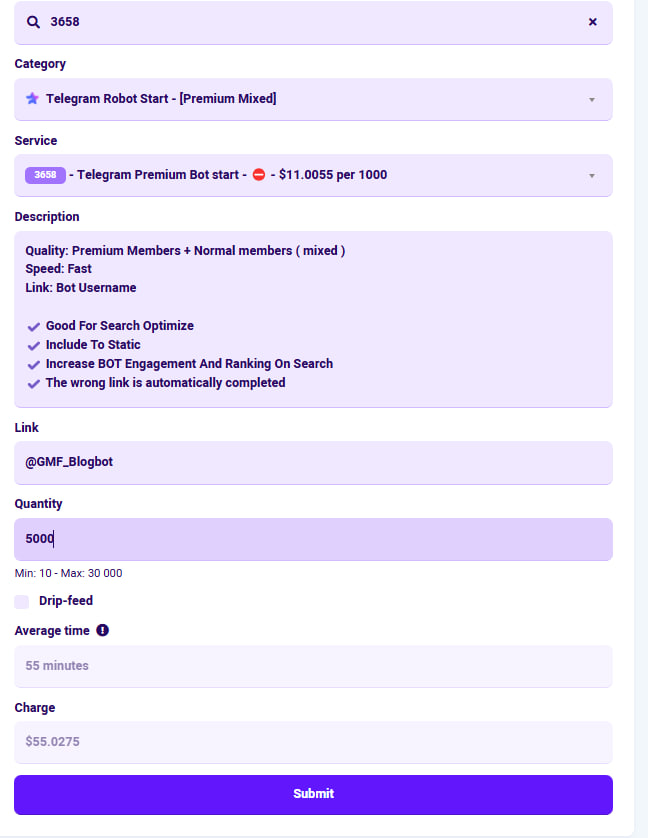
  • Example: Our "3658 Premium Package" (5K users) delivers excellent localized results

2. Supplement with Regular Members

  • Add 2K-3K regular members after premium acquisition

3. 72-Hour Incubation Period

GetMeFollowers premium member package for Telegram bot ranking

  • Allow 72 hours for system integration
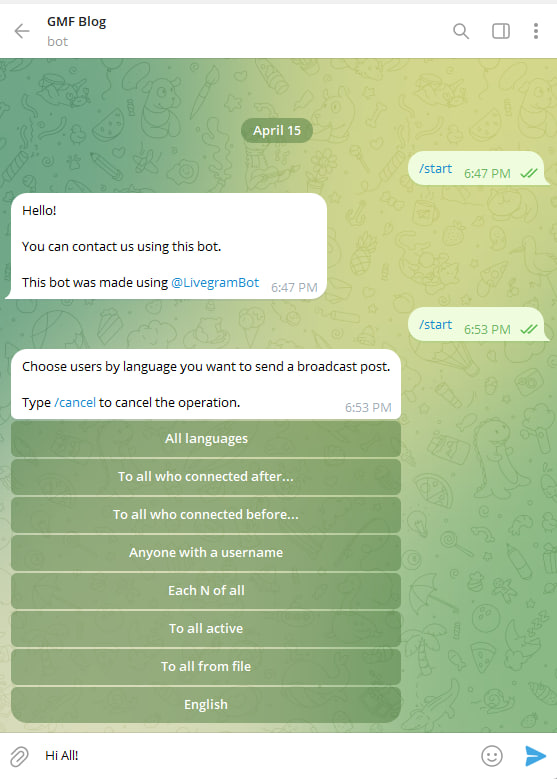
  • Then trigger an "activation shock" to wake up your bot's search visibility

Activation Methods

  • Mass messaging to all subscribers
  • Scheduled content bursts
  • Engagement campaigns

Why This Works

  • Country-specific premium users boost local SEO
  • The 72-hour wait ensures natural pattern establishment
  • The activation shock triggers Telegram's ranking algorithms

Activating a Telegram bot after adding premium members

Final Verification Steps

  1. Send Random Test Messages Dispatch a series of random messages to activate engagement tracking
  2. Bot Username Update Change your bot's username slightly (e.g., add a number) Immediately check search visibility
  3. Troubleshooting: If not appearing: Wait 12-24 hours for algorithm processing OR Add ~500 targeted members for extra boost

Success Rate

  • 99% appearance rate when properly executed
  • Appears typically within 72 hours post-activation

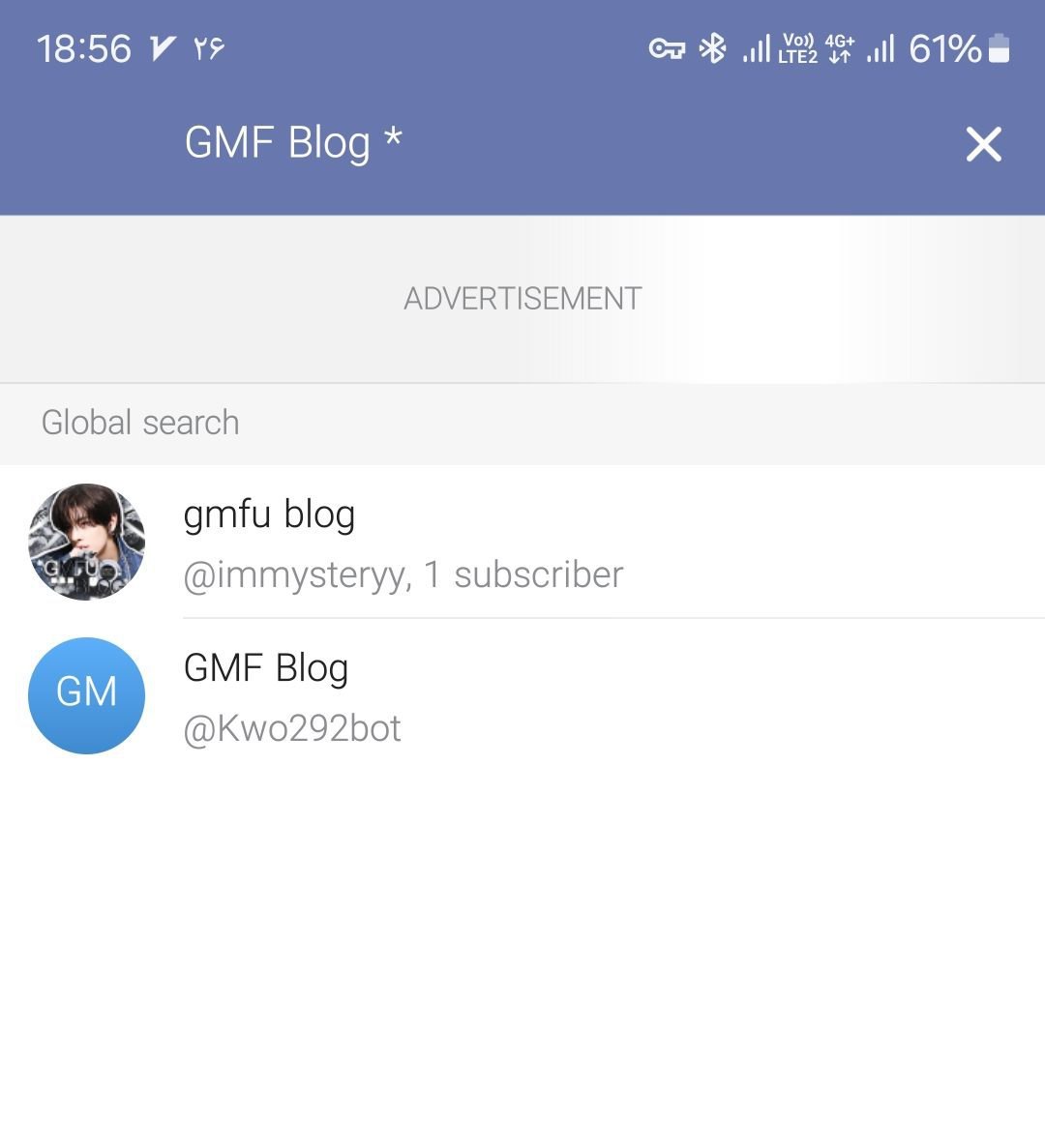
Checking the bot in Telegram search after changing its username

Pro Tip:
You can preview future search results by adding an asterisk before your query! for example  : *@%@

Want instant ranking? T.me/+88801253497

#Bot_visibility_in_Telegram

#Telegram_bot_ranking

#Global_search_Telegram

#robot_ranking

#Bot_rank

#rank_robot

Previewing Telegram search results with an asterisk before the keyword

और पढ़ें: How to Rank Your Bot in Telegram Global Search
How to Rank Your Channel in Telegram Search

How to Rank Your Channel in Telegram Search

If you're wondering how to make your Telegram channel appear higher in Telegram Search, you're not alone. Many channel owners used to rely on adding large numbers of fake members to improve their rankings, but Telegram's search algorithm has changed significantly.

Based on our experience and testing, simply increasing member count is no longer enough. This guide explains the current approach that has produced better results for many channels.

Note: Telegram does not publicly disclose how its search algorithm works. The information below is based on practical testing and observations rather than official documentation.


Why Telegram Search Ranking Has Changed

In previous years, channels could often achieve higher rankings by adding thousands of fake members. However, recent updates appear to place greater emphasis on overall channel quality and other ranking signals rather than member count alone.

If your goal is to rank for competitive keywords, you should optimize your channel correctly before trying to increase its authority.

Step 1: Create Your Channel with the Correct Country Number

One factor that appears to influence search visibility is the country associated with the account that creates the channel.

If you want to rank in a specific country's Telegram search results, create the channel using a phone number from that same country whenever possible.

Example:

  • Targeting Turkey → Use a Turkish phone number
  • Targeting Germany → Use a German phone number
  • Targeting the United States → Use a US phone number

Step 2: Choose an SEO-Friendly Channel Name

Your channel name and username should clearly describe your niche.

Recommendations:

  • Keep the channel name short.
  • Use your primary keyword naturally.
  • Limit the name to approximately four words.
  • Choose an easy-to-remember username.
  • Avoid unnecessary symbols and emojis.

Good example:

Crypto Signals Pro

Poor example:

🔥🔥Best_Free_Crypto_Signals_2026🔥🔥

Step 3: Add a Professional Profile Picture

Your profile picture is one of the first things users see.

A clean, professional logo or brand image helps increase trust and can improve click-through rates from Telegram search results.

Avoid:

  • Low-quality images
  • Random photos
  • Blurry logos

Step 4: Publish Content Before Promotion

Never leave your channel empty.

Before adding members, publish at least one high-quality post. Ideally, publish several useful posts so visitors immediately see that the channel is active.

Good content also encourages users to stay after joining.

Step 5: Increase Premium Members

Based on our testing, Premium members appear to have a stronger impact on search ranking than regular inactive members.

The number of Premium members needed depends on:

  • Your target keyword
  • Competition level
  • Existing channels already ranking

For highly competitive keywords, more Premium members may be required.

You can purchase Premium members from:

https://getmefollowers.org

Step 6: Add Regular Members

After adding Premium members, increase your channel's regular member count to make growth appear more natural.

Generally, adding between 1,000 and 2,000 regular members is sufficient for most channels.

Avoid adding extremely large numbers in a short period.

Step 7: Wait for Telegram to Update Search Rankings

Once all optimization steps have been completed, wait for Telegram to refresh its search index.

In most cases, this takes approximately 3–10 days, although the exact timing depends entirely on Telegram's systems.

There is no official method to speed up this process.

Additional Tips to Improve Telegram Search Ranking

For better long-term results:

  • Publish content consistently.
  • Keep your channel active.
  • Choose a memorable username.
  • Use a relevant profile picture.
  • Avoid changing your username frequently.
  • Encourage real user engagement.
  • Build a recognizable brand.

Frequently Asked Questions (FAQ)

How long does it take for a Telegram channel to rank?

Typically between 3 and 10 days, although this can vary depending on Telegram's indexing schedule.

Do fake members still improve Telegram rankings?

Based on our testing, fake members alone are no longer as effective as they were in the past.

How many Premium members are required?

There is no fixed number. It depends on the keyword competition and the channels already ranking for that keyword.

Does Telegram officially explain its search algorithm?

No. Telegram has not published detailed information about its ranking algorithm. Most optimization methods are based on community observations and practical testing.

Conclusion

Ranking a Telegram channel today requires more than simply increasing member count. A well-optimized channel with a relevant name, quality content, professional branding, and strategic member growth appears to perform better under Telegram's newer search algorithm.

While no method can guarantee a specific ranking, following the practices outlined in this guide can improve your chances of appearing higher in Telegram Search.

Need help growing your Telegram channel?

Visit https://getmefollowers.org or contact us on Telegram:

@premiom

और पढ़ें: How to Rank Your Channel in Telegram Search
How to Increase Your Engagement on Instagram

How to Increase Your Engagement on Instagram

A few steps to real profit!
Learn interesting ways to increase profitability in an interesting program called Instagram.

N.K
October 2022

Maybe more than half of the people (I say confidently and boldly) use Instagram only to share their favorite photos and videos or just to follow the news of the day,
but if you install Instagram as a tool for business.
You have done it, I congratulate you.
You are several steps ahead.
But for this progress, you don’t just need followers, in fact your followers are people and these people need to interact and talk.
Sometimes your words with your audience may have a significant impact on your work!
Try it!
Don’t just look for likes, I mean, when you are trying to reach an ideal weight, exercising is not enough, you must also watch your diet.
So, exercise and diet are complementary to each other to reach the ideal weight

Real views and comments or just a followers count?

In fact, in terms of Instagram’s workspace, the goal is a wider scale of visitor statistics and likes.
In fact, the growth and interest rate of my and your followers is in the number of comments, the number of saving posts and mentions.
These show that our interactions are real and that the people who are on my and your page are interested in the contents of the page

Forward to the great Engagment!

Get to know these:

– Likes and comments
– Carousel posts
– Hashtags
– Stories
– Live

Well, let’s go over the stairs together
Come with me!

The first step : Target

go to your page (work), assume that the people who follow you (even if they are strangers) are your close friends,
just as you know the taste of your close friend, what kind of color or design of clothes and food he likes.
Come on, you are obliged to know the taste of your followers and present your products accordingly. for example:
If 60% of your audience are teenagers and young people, focus more on the products they like and like for these people, but!!!!!!! Do not ignore the other 40% of people
because they also take the time to follow you.
(My suggestion to you, my dear friend, is to make your audience fully aware of this issue by posing a question or by general voting such as yes or no questions in the form of two-answer questions.)

The second step : Motivation

We are still on our way,
Stay with me with energy!
Be yourself !
You and I and your neighbor or the passerby that I am looking at from the window of my room right now,
we are all human and we have fallen into habits that are a part of our daily life, there is no need in the virtual space,
not just Instagram, from our real selves.
Be so distant that our audience does not feel good about us.
Be like yourself, my dear friend!
Even sometimes, share a post from behind the scenes of your work. When your audience sees that you accompany them with all honesty, you will definitely receive a lot of good energy.
For example, as I am writing this article, everything around me is not perfect, my room has no place to walk because there are enough clothes on the floor, or my laptop is warning that it has no more charge to continue, the samovar is boiled. and it is happening to me and there is no one to answer it….
Okay ? If I can share these, you will definitely understand that behind every literary or scientific or fictional writing or whatever… there are very irregular writers with chaotic lives.
This means that I am human like you!

The third step: Professional media

I don’t think my audience is boring, so I will continue.
When you go to a studio or ask a photographer to take professional photos of you,
what do you expect from the end result?
Undoubtedly, you also want your photos to be perfect and the best. any way because you have invested your time and money for this.
Well, about the social media (Instagram, Facebook, Twitter, etc.) is the same.
If you want to share something, value yourself first,
because you are spending the most golden and irreversible thing on this, that is, time.
So try to share the best of everything to get the best.
For example, I plan to go to my grandmother’s house on Tuesday evening and photograph her old yard.
Now I think that maybe my grandfather’s dirty bike with that beautiful apple tree with its orange leaves will give more soul to my photo, or maybe my older brother’s hat would be a good idea for a photo shoot and have a share in my photo,
Because his hat is one of those leather hats with a shiny brown color that It fascinates every viewer
Okay ? Did you see? I die for my photography so that they die for me
Hurry up!
Create a beautiful frame

Fourth step: Carousel posts

Well, breathe!
Let’s begin ?
Now you and I seem to have things to share and introduce our products.
For example : I have five images and I want to share them,
if I share each of these images in the form of separate posts and there are five posts on my page, would you be interested in all five? To put the image in the form of a post, but in a page-by-page format?
To be honest, I like the excitement of Carousel posts more because I don’t know what is hidden inside this post….
It is also interesting to know that according to the Instagram
algorithm these types of posts are displayed more often and have a higher chance of being seen.

Fifth step : Caption

Well, now you and I tried our best to share the best pictures or videos on our social page.
Can you pass it by without describing it to your audience?
Really, the value of a post on Instagram is its description and explanation,
so write valuable captions as much as you can.

The sixth step: Time

Hum…? Yes?
Hi mom… Oh sorry,
I completely forgot about this,
I’ll be there in half an hour.

Well, I apologize to the readers of this article, I forgot the important appointment that my mother told me earlier, I have to reach my mother’s house in half an hour, the elders of the family have come to our house tonight.
But before that, I want to tell you something important:
Be punctual!
Aboute to Instagram ,
share the posts you have prepared at the right time (usually at night when people are sleeping, posting does not have a good effect)
So be punctual and practice it.
Don’t be like me, I may have less than half an hour to get myself to the party, but I’m still at your service and busy writing…

Seventh step: Discussion

Coffee ! Here you are…
Well, my fatigue disappeared by drinking a cup of coffee,
I suggest you too.
I would like to start today’s topic by asking a question.
Are you ready?
Ok…
Someone who is very respectful and appreciable to you ,
asks you a question or criticizes you, how will you answer him? Undoubtedly, your answer is that you will talk to him with respect and logic.
Well, if someone on your social page asks you a question about your product (either in the public section, i.e. comment or in the private section, i.e. Direct) or if he criticizes your product, you should definitely answer him completely and with full understanding.

Eighth step: Save post

We are slowly approaching the end of the way

I have already talked about trying to share the right posts
But if you refer to Instagram, sometimes you don’t have enough time to watch a video or read an article, but despite this,
you are very eager to watch and read the post, so you save the desired post so that you can access it later when you have enough time. have that access. What I mean is that you should post posts that your audience will not miss in any way, which means that even your post should be able to be saved.
Can you be so professional?
You can definitely…

Ninth step: Hashtags

There is nothing left until the end…
Have you ever used hashtags?
If you have a valuable post, it is enough to use only a few hashtags but in the right format to see its effect,
in general, according to the statistical community, ten hashtag or less is a good number to look professional.
For example: if you work in the field of architecture and decoration design and your post is related to the design of the green space at home, you can use # related to it in the caption because there may be people who search these hashtags in Explorer,
with the page get to know you

10th step: Story

There is only one more step left…
Well, my dears, until now all our attention was on sharing the post and how to place it and the details related to it, but Instagram has another feature called story.
If you want my opinion, access to stories is much more, so people who are interested in your page will be attracted to your story, and it is a good excuse to visit your page.

And the last step : Live

Do not be tired …
Now that I am writing this for you, I wish we could have talked for hours in front of each other
But?! Maybe we can!
how about you?
Would you like to talk face to face with your followers?
Share your thoughts and…
So try it and start live on your page

Thank you for accompany with me

और पढ़ें: How to Increase Your Engagement on Instagram
8 Ways to Increase Telegram Interaction

8 Ways to Increase Telegram Interaction

Telegram is one of the most popular messaging apps in the world, with hundreds of millions of monthly active users. That makes it a great place to promote your products, your brand or your content – all you need is a smartphone and the Telegram app.

But a big channel is not enough on its own: you need members who read, react and share. Here are eight practical ways to increase interaction in your Telegram channel or group.

1️⃣ Choose a suitable name

When a child is born, his/her parents choose a suitable name for him and even many families choose a name for them months before the birth of their baby.
So it’s enough to know that the first step in growing something is to choose a suitable name and it has an amazing effect.
Telegram is the same, if you are looking for a good and effective channel with active members, first choose a good and special name.
From the beginning, it has been an admirable idea to be new and far from any imitation.
Do not try to imitate the popular and crowded channels even in naming.
Do you like your two daughters to have the same name?
So think deeply about this subject and even think of a short and special name for days.

2️⃣ Make your own logo

Make a special logo and put it as your channel’s profile picture in Telegram.
Create your own unique logo because you are unique. Don’t pretend to be someone else. Create a logo so that whenever someone mentions the name of your channel, your logo design will quickly be drawn in their mind.
For example, now, if the name of my high school physics teacher is mentioned, the image of that dark blue jacket and light blue shirt with shiny leather shoes is immediately formed in my mind, with his black pen in which he always got lost in the class, wow, how much he was always asking for lessons of his students
we experienced scary Tuesdays with him…
Oh, how far I have strayed from the main topic…how can I do it? Suddenly, when I hear his name, all the things I said are imprinted in my mind.

Just decide and do it.

3️⃣ Create a username

After choosing a suitable name for your channel and creating your desired logo, now it’s time for a username.
Username will help you a lot to increase your channel members.
It is not hard work.
join me…
Just put your username the same as your channel name and after
http://telegram.me/
Enter your username (after /)
In this way, without people having your mobile number, they can find you just by searching your username in Telegram.

4️⃣ Introduce your channel

Review the previous three.
Now it’s time to introduce your channel.
Even if a person is present in your channel, he or she should know your channel and purpose.
so introduce with detailed explanations.
Preferably do this in the description section.
(Of course, I have another suggestion for you, dear,
ones in addition to introducing your channel in the description section, you can design a message in the form of a detailed introduction of yourself and what your purpose is for creating this channel, and before creating any post , put it in your channel and pin this message in the early days.)

5️⃣ Search and research

Shall we talk a little?
I want to go with Emily to buy shoes tomorrow morning.
I did a lot of research before buying shoes, what are the characteristics of a good shoe? what gender is it ?
which brand is better?
which design do I like the most? and which one do I have with the shoes I am considering? It matches my clothes… Ah, excuse me, do you really know Emily? She is my older sister who is always with me as a guide
Okay! I have no doubt that you also research everything and increase your information and then take action. If you have the right guide, you can quickly find new and loyal members.
It means that you should first know what your channel is about and then search and find channels that are similar to yours and read it carefully from the first post to the last and follow them, but imitation is prohibited, only design and Know their general idea.

6️⃣ Be on time

Respect your channel members, even if their number is very small, you must not have many members of your channel so that you can make a regular plan for them.
You must have had a date with your friends, how do you feel when you arrive half an hour late? This is definitely not very pleasant.
Try to post on your channel at a certain time and on certain days, for example :
If you make two posts or articles on Monday morning, post exactly the same post on Monday morning of the next week.
If you post three days a week, do the same for the following weeks. Let’s find your loyal members, so your channel members will feel good about your

activities.

7️⃣ Clean up

Clearing !
Suppose you are sitting in biology class, but your teacher teaches math!!!!!!
what happens?
To be honest, if i were you ,
I would have liked you badly and would have left the class faster…
Now imagine about Telegram
like a class, your members definitely don’t like unrelated posts and content,
and even if I’m looking for the channel i want right now and want to become a member, if a post unrelated to my desired topic,
Let me see, i will leave there with one click.
how about you?

8️⃣ Take advertisements seriously!

Advertise
There are several ways to introduce your channel to other people:

1) I and many other people are members of social media such as Instagram, Facebook, etc. (I have already talked about Instagram)
If you are looking to increase the number of people in your channel, Do not neglect the power of advertising on Instagram and other social media, just announce it there and ask your followers to visit your channel.

2) You can from the admins
Ask other channels to advertise for you and you also advertise their channel, but first of all, you should pay attention to the content of that person’s channel, as well as the number of members and views of his posts, If the channel is not interesting or if the number of views per post is very limited.
So don’t waste your time.

3) BOMBBBBBBBBBBB!!!!!

An easy and wonderful way
You can have a lot of new and real people in your channel at once. This ad is paid, but it’s worth it. Try it even once!

और पढ़ें: 8 Ways to Increase Telegram Interaction